Dottedline Shapes: Precision Vector Assets for Design
In the world of digital design and print production, consistency is often the difference between a polished final product and a messy compromise. When you are working on complex layouts, technical illustrations, or intricate craft projects, relying on hand-drawn lines or inconsistent stock graphics can introduce errors that are difficult to correct later. This is where Dottedline Shapes becomes an essential tool in your workflow. These are not merely decorative elements; they are precise, scalable vector assets designed to bring structure, clarity, and professional polish to a wide variety of creative and commercial applications.
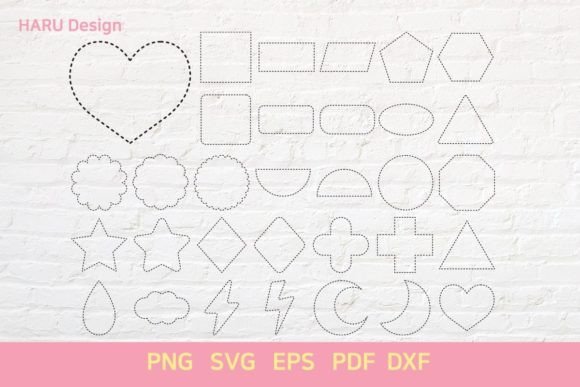
The specific collection we are examining here offers a comprehensive suite of 31 distinct shapes, available across five critical file formats: SVG, EPS, PNG, PDF, and DXF. Each shape is standardized to a 12in×12in artboard size, ensuring that whether you are designing a greeting card, preparing a laser-cut template, or creating a social media graphic, your dimensions remain consistent and predictable. For professionals and hobbyists alike, this standardization removes the guesswork from scaling and positioning, allowing you to focus on the creative vision rather than the technical logistics.
The Power of Multi-Format Compatibility
One of the most significant advantages of this asset pack is its versatility across different software ecosystems. Modern design workflows rarely rely on a single application. A designer might sketch in Illustrator, edit in Photoshop, prepare files for web use, and then send cut files to a vinyl cutter or laser engraver. Dottedline Shapes addresses this fragmentation by providing the same high-quality geometry in formats tailored to each stage of production.
- SVG (Scalable Vector Graphics): Ideal for web designers and developers who need crisp, resolution-independent graphics that load quickly and scale perfectly on any screen size. SVGs are also editable in most vector software, making them perfect for further customization.
- EPS (Encapsulated PostScript): The industry standard for professional print workflows. EPS files preserve vector data with high fidelity, ensuring that dotted lines remain sharp and accurate when sent to commercial printers or used in Adobe InDesign layouts.
- PNG (Portable Network Graphics): While raster-based, these files offer transparency and are ready for immediate use in photo editing software like Photoshop or GIMP. They are particularly useful for quick mockups or when integrating shapes into pixel-based compositions.
- PDF (Portable Document Format): Beyond document sharing, PDFs can contain vector paths that are compatible with many cutting machines and layout programs. This format ensures that your dottedline shapes retain their structural integrity regardless of the operating system used to open them.
- DXF (Drawing Exchange Format): Crucial for fabrication. If you are using CNC routers, laser cutters, or plotters, DXF is often the required input format. It allows hardware to read the exact coordinates of the dotted lines, enabling precise physical cuts without manual tracing.
Why Standardized Artboard Sizes Matter
The specification of a 12in×12in artboard size might seem arbitrary, but it aligns with common standards in scrapbooking, card making, and certain print-on-demand services. By providing assets pre-sized to this dimension, the Dottedline Shapes pack saves users valuable time. Instead of manually resizing, repositioning, and checking bleed areas for every individual element, creators can drop these shapes directly into their project templates.
This efficiency is particularly beneficial for small business owners and freelancers who manage tight deadlines. When you know that every shape fits within a known boundary, layering becomes intuitive. You can stack multiple dottedline shapes to create complex patterns, borders, or backgrounds without worrying about unexpected overflow or misalignment. For educators and bloggers, this means faster creation of educational materials, worksheets, or visual aids that look professionally designed without requiring advanced graphic design skills.
Practical Applications Across Industries
The utility of Dottedline Shapes extends far beyond simple decoration. Consider the needs of a marketing agency creating a campaign brochure. Dotted lines are excellent for indicating connections, timelines, or steps in a process diagram. Using the EPS or PDF versions, marketers can integrate these shapes seamlessly into corporate branding guidelines, ensuring that even abstract concepts are presented with clean, geometric precision.
For entrepreneurs in the handmade goods space, the DXF and SVG files are invaluable. Imagine creating custom packaging inserts or laser-engraved wooden signs. The dottedline shapes can serve as guides for cutting paths or as aesthetic elements that add texture to the final product. Because the vectors are mathematically precise, the resulting physical products will have uniform spacing and alignment, elevating the perceived quality of the brand.
Even in digital content creation, these shapes offer unique opportunities. Bloggers and social media managers can use the PNG versions to create eye-catching dividers, bullet points, or frame elements for infographics. The dotted aesthetic softens rigid layouts, guiding the viewer’s eye through content in a way that solid lines sometimes fail to do. It creates a sense of movement and rhythm, which can improve user engagement and readability.
Enhancing Creativity Through Constraints
Paradoxically, having a limited set of well-defined tools can enhance creativity. With 31 carefully curated shapes, users are encouraged to experiment with repetition, rotation, and scaling. Rather than searching endlessly for the "perfect" clipart, designers can focus on composition. How does a dotted circle interact with a dotted square? What happens when you overlap two shapes at different opacities?
This approach supports problem-solving by simplifying decisions. When the building blocks are reliable and consistent, the creative energy is freed up for higher-level conceptual work. For instance, an educator designing a worksheet might use these shapes to create interactive elements or visual cues for students, helping to organize information clearly and reduce cognitive load.
Considerations for Best Results
While Dottedline Shapes offers significant benefits, it is important to use them appropriately. Always check the line weight and dot density when zooming in, especially for print jobs. While vectors scale infinitely, extremely fine details may become invisible if printed at very small sizes or if the printer’s resolution is low. It is advisable to test prints or export previews before committing to large-scale production.
Additionally, consider the context of your audience. In some minimalist designs, heavy dotted patterns can appear cluttered. Use these shapes strategically to highlight key areas rather than overwhelming the entire layout. Compare the different file formats for your specific end-use; for example, prefer SVG over PNG for web responsiveness, or DXF over EPS for laser cutting accuracy.
Conclusion
Ultimately, the value of Dottedline Shapes lies in its ability to bridge the gap between concept and execution. By providing high-quality, multi-format assets in a standardized size, it empowers creators to produce cleaner, more professional work with greater efficiency. Whether you are crafting digital content, preparing print materials, or fabricating physical goods, these shapes offer a reliable foundation for your creativity. Embracing such structured resources allows you to maintain consistency across all your projects, strengthening your communication and supporting your long-term goals with less friction and more impact.