Red Brush Stroke Clipart Set
In the landscape of digital design, visual elements often serve as the bridge between a concept and its final execution. Among these elements, brush strokes offer a unique texture that can elevate a flat design into something with depth and character. The Red Brush Stroke Clipart Set is a specific collection of digital assets designed to provide designers, hobbyists, and content creators with high-quality, transparent graphical elements. This evaluation explores what this set entails, who it serves best, and how it fits into various creative workflows.
Understanding the Product Offering
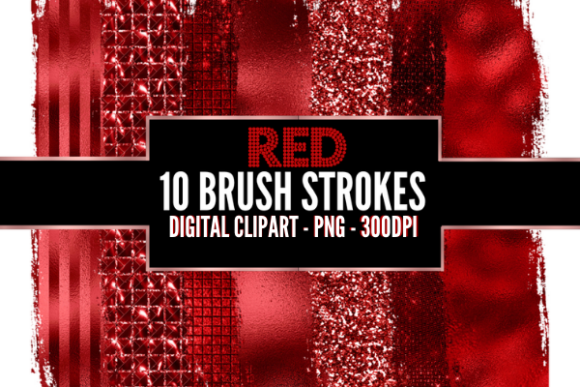
The core of the Red Brush Stroke Clipart Set lies in its simplicity and utility. It consists of ten distinct PNG brush stroke files. Unlike vector illustrations that rely on mathematical paths, these are raster images created at a high resolution. Specifically, each file is provided at 300 DPI (dots per inch). This specification is critical for print applications, ensuring that when the brush strokes are scaled or placed on physical media like flyers or calendars, they remain crisp and free from pixelation.
A defining feature of this set is the transparency of the PNG files. In graphic design, background removal is often a tedious process. By providing pre-transparent files, the creator allows users to overlay the red strokes directly onto any background—whether it is white, black, or a complex photographic image—without worrying about unwanted white boxes or borders surrounding the art. The files are delivered in a ZIP folder, requiring extraction before use, which is a standard distribution method for digital downloads to preserve file integrity and organize multiple assets efficiently.
Why Designers Choose Brush Strokes
To understand the value of this specific set, one must first consider why brush strokes are utilized in design. Organic shapes break the monotony of geometric grids and straight lines. A red brush stroke, in particular, carries psychological weight; red is associated with energy, passion, urgency, and attention. When applied as a textured element rather than a solid block of color, it adds a human touch to digital compositions.
Users interested in this clipart set are likely looking for ways to add flair without spending hours painting custom textures from scratch. Whether creating a social media banner for a sale, designing a wedding invitation, or illustrating a blog post header, these strokes provide an immediate aesthetic upgrade. They serve as accents that guide the eye, highlight text, or frame other visual elements.
Benefits and Practical Applications
The versatility of the Red Brush Stroke Clipart Set makes it suitable for a wide array of projects. Below are key areas where this asset proves beneficial:
- Social Media Marketing: For platforms like Instagram or Facebook, eye-catching visuals are paramount. Red brush strokes can be used to create dynamic backgrounds for quotes, promotional announcements, or event reminders. The high resolution ensures the graphics look professional even when viewed on high-density mobile screens.
- Print Collateral: Because the files are 300 DPI, they are ideal for print-on-demand services. Flyers, business cards, and brochures can incorporate these strokes to add a hand-crafted feel to mass-produced materials. This is particularly effective for brands aiming for an artisanal or boutique image.
- Calendar and Planner Design: Seasonal designs often benefit from thematic colors. Red strokes can accentuate Valentine’s Day themes, holiday sales, or summer campaigns in calendar layouts, adding visual interest to dates and headers.
- Digital Projects: Bloggers and website designers can use these transparent PNGs as decorative dividers or highlights within web content. They help break up long-form text and maintain reader engagement through varied visual pacing.
Evaluating Tradeoffs and Limitations
While the Red Brush Stroke Clipart Set offers clear advantages, potential users should be aware of certain limitations inherent to this type of digital asset.
Resolution Constraints: Although 300 DPI is excellent for most standard print sizes, it is not infinite. If a designer attempts to scale a single brush stroke to the size of a billboard or a large-format poster, the image may become pixelated. Users must plan their layout dimensions carefully to ensure the strokes are used at appropriate scales.
Lack of Editability: As raster PNG files, these brush strokes cannot be easily edited in vector software like Adobe Illustrator. You cannot adjust the thickness of the stroke, change the gradient, or modify the shape after download. If a user requires a specific variation of the stroke that is not included in the ten-file set, they will need to find additional assets or create custom brushes.
Color Specificity: The set is explicitly "Red." While this is a strength for cohesive branding, it limits flexibility for projects requiring blue, green, or neutral tones. Users working on multi-colored designs may need to source additional clipart sets to match their palette.
Decision-Making Insights: Is This Set Right for You?
Selecting the right digital assets depends on aligning the product features with your specific project requirements. Here is a framework to help determine if the Red Brush Stroke Clipart Set is a strong fit.
Situations Where This Set Excels
This set is an excellent choice if you are a freelance graphic designer working under tight deadlines and need quick, high-quality accents. It is also highly suitable for small business owners creating their own marketing materials using tools like Canva or Photoshop. If your brand identity relies heavily on red tones and organic textures, this set provides a consistent and professional look without the cost of hiring an illustrator for every individual project.
Furthermore, educators and students creating educational posters or classroom decorations can benefit from the ease of use. The transparent background allows for easy layering over colorful paper textures or photographs, simplifying the creation process for non-designers.
When to Consider Alternatives
If your project involves large-scale printing beyond standard flyer sizes, you might prefer vector-based brush stroke packs. Vectors allow for infinite scaling without loss of quality. Additionally, if your design needs require a variety of colors beyond red, purchasing a multi-color bundle would be more cost-effective than buying separate single-color sets.
Designers seeking highly customizable elements might find raster clips limiting. In such cases, exploring brush tool presets for software like Procreate or Photoshop may offer more control over the final appearance, allowing for unique variations each time the brush is applied.
Final Thoughts on Integration
The Red Brush Stroke Clipart Set represents a practical solution for adding texture and vibrancy to digital and print designs. With ten high-resolution, transparent PNG files, it covers the fundamental needs of many common design scenarios. The key to success with this asset lies in proper usage: respecting the resolution limits for scaling, leveraging the transparency for seamless integration, and recognizing its role as an accent rather than a primary focal point.
For those evaluating their options, the decision ultimately rests on the balance between convenience and customization. If speed and professional polish are priorities, this set delivers significant value. However, if absolute flexibility and scalability are required, investing in vector resources or custom illustration services may be the more prudent path. By understanding these distinctions, creators can make informed choices that enhance their workflow and support their artistic goals.